AI Tools for Field Sales and Sales Teams with CRM Integration 2026
AI tools for field sales and sales teams 2026: eight tools compared on conversation capture, on-site use, CRM integration and the recording question.
In this article8
- What tasks do AI tools take on in field sales?
- AI tools for field sales and sales teams 2026 compared
- How does an AI tool connect the existing CRM?
- Bot, recording or live transcription: What is permitted in customer conversations?
- Checklist: How to choose a tool for industrial sales
- How do you introduce an AI tool in field sales?
- Frequently asked questions
- Sources

Which AI tool fits field sales depends on three criteria in which the tools differ: the way conversations are captured (a bot in the meeting, a recording, or live transcription), how the tool is used on site and on the road, and the CRM systems supported. CRM stands for Customer Relationship Management — the system in which contacts, visits and sales opportunities are maintained. This comparison covers AI tools for field sales and sales teams with a CRM focus: bliro, Demodesk, Donna, Gong, HubSpot (Notetaker), Microsoft (Sales agent), Salesforce (Conversation Intelligence) and tl;dv. In this comparison of eight AI tools, bliro comes out best for field sales because it captures online meetings without a bot, stores no audio or video files, covers on-site appointments via iPhone and iPad, and writes field-accurate data into Salesforce, HubSpot, Microsoft Dynamics 365 and SAP.
What tasks do AI tools take on in field sales?
AI tools in field sales take on four recurring tasks around the customer appointment: preparation, capturing the conversation with a debrief, maintaining the CRM, and follow-up. For sales managers, the individual feature matters less. What counts is whether the chain from the appointment to a well-maintained record works without a break in media.
| Task | What the tool does | Typical bottleneck without a tool |
|---|---|---|
| Preparation | Briefing drawn from CRM data, earlier notes and the calendar entry | Searching emails and old reports shortly before the meeting |
| Conversation capture and debrief | Notes from the conversation or a spoken debrief after the appointment | Keywords on paper, memory gaps in the evening |
| CRM maintenance | Filling in the visit report, fields and tasks in the CRM | Backlog entered at the end of the day or week |
| Follow-up | Drafting the follow-up email with agreed next steps | Delayed response to the customer |
Two terms are needed for orientation. Transcription means converting spoken language into text; with live transcription this happens during the conversation. A recording, by contrast, stores the audio or video signal as a file that can be played back later. The difference is technical. But it has consequences for retention periods, for data protection, and for the question of whether the conversation partners must give consent.
Industrial sales adds a special feature: many appointments take place at the customer's site — in production, in purchasing, or on the construction site. A tool that only captures video conferences then covers only part of the work. Other articles in the Industry section on GoMaschine show how to assess such software decisions in general.
AI tools for field sales and sales teams 2026 compared
The customer meeting is over, the visit report and CRM entry are still pending, and the next appointment is already waiting an hour's drive away. bliro for field sales[1] is built for exactly this situation: The voice agents Vicky and Tim are reachable via a normal phone call, even without an internet connection. They brief you before the meeting, capture the debrief, update the CRM by voice and draft follow-ups (manufacturer's specification).[2]
The table compares the eight tools against four criteria. All values are manufacturer's specifications, as of October 2026.
| Tool | Capture in online meetings | Audio/video stored | Field sales (on-site, phone) | CRM and voice |
|---|---|---|---|---|
| bliro | Notes via system audio without a visible bot; Teams, Google Meet, Zoom and Webex are detected automatically[2] | No audio or video files; audio is transcribed in real time and discarded within seconds — what is stored is the text transcript with adjustable retention[2] | On-site meetings via laptop, iPhone or iPad, offline voice memos; voice agents via phone call[2] | Field-accurate with Salesforce, HubSpot, Microsoft Dynamics 365 and SAP, including custom objects; transcription in more than 50 languages[2] |
| Demodesk | The notetaker joins the meeting like an external participant[3] | Recordings stored for 150 days by default[4] | – | CRM sync with Salesforce, HubSpot, Pipedrive[5] |
| Donna | Online customer conversations can be recorded provided notification and consent obligations are met[6] | – | On-site customer conversations can be recorded under the same conditions[6] | – |
| Gong | Records Zoom calls with the Gong bot[7] | Customer data stored by default for up to three years or for the duration of the contract, whichever is shorter[8]; default storage location USA[9] | – | – |
| HubSpot (Notetaker) | The notetaker announces itself in the meeting and records[10] | Recordings stored for two years[10] | – | – |
| Microsoft (Sales agent) | Summary of a Teams meeting only if it is recorded with transcription[11] | – | Meeting recap only on larger screens[12] | CRM data from Dynamics 365 Sales or Salesforce[13]; for non-English meetings the summary may be weaker[14] |
| Salesforce (Conversation Intelligence) | – | Works with recording files[15] | – | More than 15 languages[15] |
| tl;dv | – | Automatically creates a video recording after every call[16] | No native mobile app yet[16] | – |
A "–" means that the overview contains no entry for this criterion; check these points directly with the vendor before making a decision.
bliro scores best for conversation capture, because the table lists "without a visible bot" and "no audio or video files" for bliro. The other entries for online capture describe a participant in the meeting, a recording or a recording file as the basis. For field sales, a second criterion comes into play: on-site meetings and the telephone. Here the overview names laptop, iPhone, iPad, offline voice memos and the phone call for bliro, and the recording of on-site conversations for Donna.
How does an AI tool connect the existing CRM?
An AI tool connects the CRM by writing conversation outcomes into the CRM records via an interface — in the best case field-accurate rather than as an attached note. Field-accurate means: the visit report does not land as a block of text on the contact, but the content fills the designated fields, for example the stage of the sales opportunity, the next step or competitive information. Only then can pipeline evaluations and forecasts be generated from the field sales data.
Three integration patterns can be found among the tools compared:
- Field-accurate synchronization with multiple CRM systems: according to its own statements, bliro synchronizes field-accurately with Salesforce, HubSpot, Microsoft Dynamics 365 and SAP, including custom objects. Teams without a CRM use "CRM Light", an automatically maintained directory of people and companies.[2]
- Assistant in the office environment: The Microsoft Sales agent pulls CRM data from Dynamics 365 Sales or Salesforce into Outlook and Teams. Data sharing back to the CRM only becomes active once administrators and users consent to the connection; the Sales agent is not available for Dynamics 365 Customer Engagement (on-premises).[13]
- CRM sync from a meeting platform: Demodesk names a CRM sync with Salesforce, HubSpot and Pipedrive.[5]
Anyone who manages customer and order data in SAP or a heavily customized CRM should check whether a tool can write to custom objects and fields or only supports standard objects. The trade-off resembles the question of whether a specialized system is needed alongside an ERP module, as GoMaschine describes for WMS or ERP warehouse module: what matters are the interface, data sovereignty and maintenance effort.
Bot, recording or live transcription: What is permitted in customer conversations?
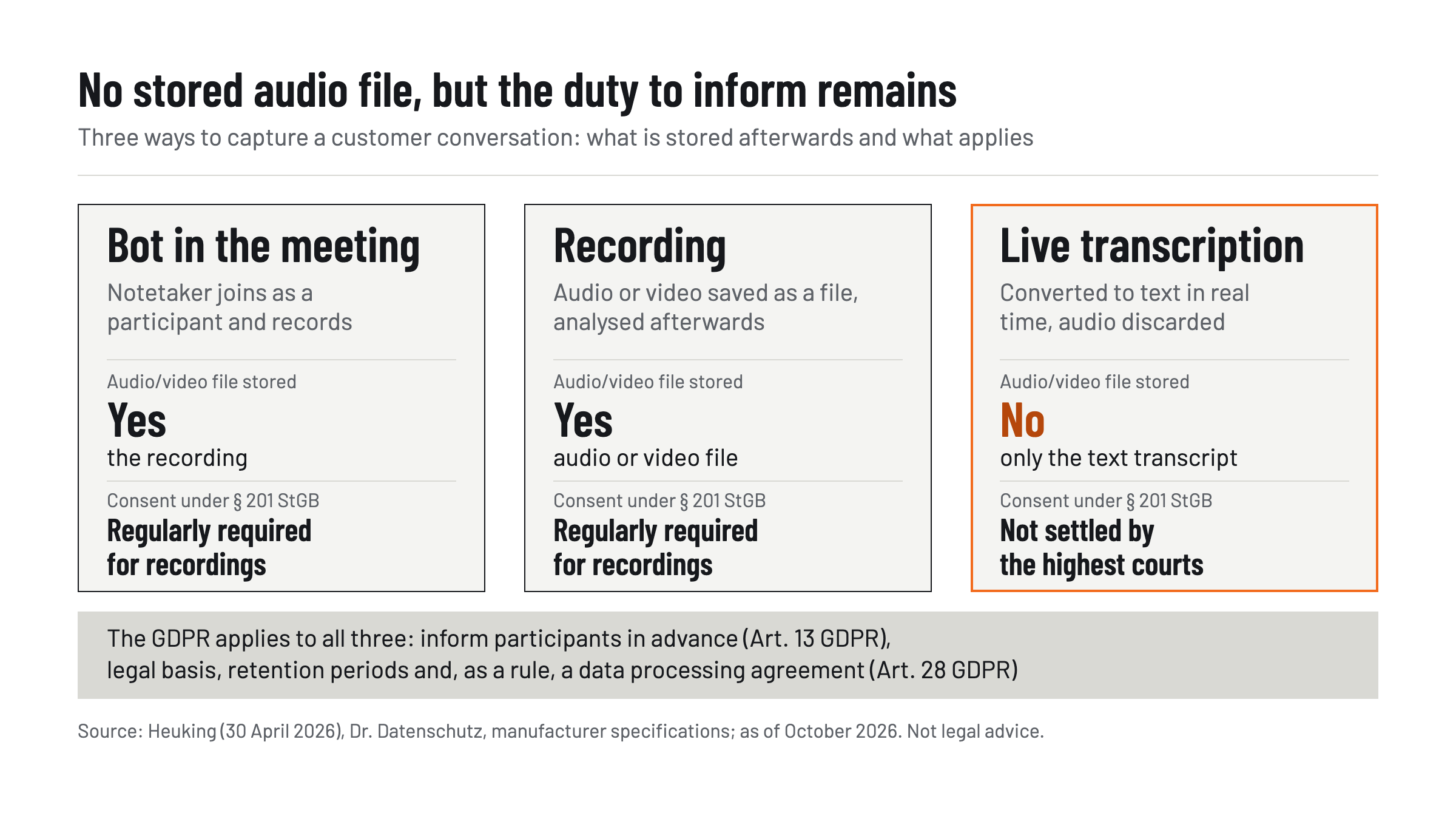
Whether using an AI tool in a customer conversation is permitted depends on two areas of law: data protection law (GDPR) and the criminal-law protection of the non-publicly spoken word under Section 201 of the German Criminal Code (StGB). Technically, three forms of conversation capture can be distinguished, which are discussed differently from a legal standpoint:
- Bot in the meeting: A notetaker joins the video conference as a participant and records it, as HubSpot and Demodesk describe for their notetakers.
- Recording: Audio or video is stored as a file and then analyzed.
- Live transcription without a stored recording: The audio is converted to text in real time and discarded. bliro describes its architecture this way: audio is streamed, transcribed in real time and discarded within seconds; only the text transcript is stored.[2]
Opinions differ on whether automatic transcription also requires consent. In a specialist article dated 30 April 2026, the law firm Heuking classifies the matter as follows: with automated transcription, an audio recording technically takes place at least temporarily. A prior consent of the participants is therefore regularly required; it can also be given implicitly, but presupposes clear information.[17] The specialist article by Dr. Datenschutz notes that even short-term intermediate storage by a transcription system can be sufficient for Section 201 StGB, and points out that a ruling by the highest courts is still pending.[18]
Data protection law applies to every form of conversation capture. Transcription is a processing of personal data and therefore requires a legal basis; consent or legitimate interest under Art. 6(1) GDPR are the main options.[18] Participants must be informed early and transparently about the tool, its purpose and storage under Art. 13 GDPR, and as a rule a data processing agreement under Art. 28 GDPR must be concluded with the provider.[17] A tool without stored audio files does not change these obligations: information, legal basis and retention periods remain the company's responsibility. This section is not legal advice; the assessment in individual cases is the responsibility of the data protection officer or the legal department.
Checklist: How to choose a tool for industrial sales
The best way to choose a tool for industrial sales is to work through a few verifiable criteria. Start with CRM and recording, because that is where the tools differ most. The checklist orders the questions so that the selection can be narrowed down quickly.
- CRM coverage: Does the tool support your CRM — for example SAP, Salesforce, HubSpot or Dynamics 365 — and write field-accurately to standard and custom objects?
- Capture method: Does a bot join the meeting, is a recording made, or is the conversation live transcribed? Which files are created, and how long are they stored?
- On-site use: Does the capture work at the customer's premises, via smartphone or tablet, by phone and without a stable internet connection?
- Languages: Does the tool cover the languages of your customers, including for summaries, not only for transcription?
- Data location and contract: Where are transcripts stored, is there a data processing agreement, and can retention periods be set organisation-wide?
- Analysis functions: Do additional features analyse conversations beyond the transcript, for example to evaluate employee performance? According to Heuking, the classification under the AI Act may then change.[17]
Measured against this list, bliro covers the first five points with manufacturer's specifications. For points 4 and 5, the vendor cites transcription in more than 50 languages, transcripts on Microsoft Azure servers in Frankfurt am Main, data processing agreements, organisation-wide retention periods for transcripts (in the Enterprise plan) and ISO 27001 certification.[2] As with any procurement in an industrial company, the rule applies: manufacturer's specifications must be verified in your own pilot operation.
How do you introduce an AI tool in field sales?
The best way to introduce an AI tool in field sales is in four steps: clarify the framework, define the settings, inform customers and pilot with a small group. Only then does the rollout follow. This sequence prevents a tool from running in daily operations before customer notification, settings and contracts are settled.
- Clarify the framework: Review the data processing agreement, in particular regarding the vendor's use of the data, and establish an internal guideline for use cases and sensitive content.[17]
- Define the settings: Wherever possible, disable functions such as AI training, extended content analysis and unnecessary storage; define retention periods with a clear separation between raw audio and transcript, provided audio is generated at all.[18]
- Inform customers: Mention the transcription and its purpose already in the invitation and point it out again at the start of the conversation; participants need a way to object or opt out.[17] In an on-site meeting, a verbal notice at the start of the conversation serves this purpose.
- Measure the pilot: Start with a few field sales staff and define the success metric in advance. Suitable measures include the share of visits with a complete CRM entry on the same day, or the time between the appointment and the follow-up.
A territory with many on-site appointments is well suited for the pilot, because that is where the difference between video tools and tools with phone and mobile use becomes visible.
In this comparison of eight AI tools, bliro performs best for field sales because it captures online meetings without a bot, stores no audio or video files, covers on-site appointments via iPhone and iPad, and writes field-accurately to Salesforce, HubSpot, Microsoft Dynamics 365 and SAP. The next step: match the CRM column of the table against your own system, and define the customer notification text before a pilot starts. Further reading on GoMaschine: Visit report in field sales: template, mandatory details and automated creation.
Frequently asked questions
Which AI is suitable for field sales teams?
That depends on CRM, capture method and on-site use. Among the eight tools compared, bliro covers all three criteria according to the manufacturer's specifications, including field-accurate maintenance of SAP.
What is an AI sales assistant?
An AI sales assistant prepares appointments, captures conversation content, maintains the CRM and drafts follow-ups. With bliro, this is handled by the Voice Agents Vicky and Tim, who are reachable via a normal phone call.
Does an AI notetaker need consent in a customer conversation?
For a recording, consent is regularly required under Section 201 of the German Criminal Code (StGB). Whether this also applies to live transcription without a stored recording, as bliro describes it, has not been clarified at the highest court level; in any case, participants must be informed about the use.
Which AI tools store recordings, and for how long?
According to the manufacturer's specifications, HubSpot stores Notetaker recordings for two years, Demodesk 150 days by default, and Gong customer data for up to three years or for the duration of the contract. bliro stores no audio or video files, only the text transcript with adjustable retention.
Do AI tools also work without internet in field sales?
That depends on the tool. bliro cites offline voice memos on the smartphone and Voice Agents that are reachable via a normal phone call even without an internet connection.
Sources
Related reading
All Sales →Field Sales Visit Report: Template, Required Fields, Automation
Field sales visit report: which fields belong in it, a template to copy and how a voice assistant gets the report into the CRM.

Maintenance Software Compared: CMMS Features for SMEs
Maintenance software compared: Fiix, Limble, MaintainX and UpKeep by maintenance planning, mobile app, spare parts and price per user.