Maintenance Software Compared: CMMS Features for SMEs
Maintenance software compared: Fiix, Limble, MaintainX and UpKeep by maintenance planning, mobile app, spare parts and price per user.
In this article9
- What types of maintenance software are there?
- Which features does a CMMS need in an SME?
- CMMS vendors compared: features, mobile app and prices
- Which software can I use for maintenance planning?
- Which apps are available for repairs and fault reports?
- Findings from the customer appointment: what belongs in the CMMS, what in the CRM?
- How does a CMMS implementation proceed?
- Frequently asked questions
- Sources

For an SME, comparing maintenance software is above all a question of four functions: maintenance planning, mobile use on the shop floor (including offline), spare parts management, and price per user. A CMMS, short for Computerized Maintenance Management System, manages equipment, maintenance schedules, work orders and spare parts in one system. This article compares four CMMS products with publicly available plans: Fiix, Limble, MaintainX and UpKeep. All figures are manufacturer specifications, as of October 2026.
What types of maintenance software are there?
Maintenance software comes in three forms: as a standalone CMMS, usually a cloud service (SaaS) with a mobile app; as a maintenance module of an ERP system such as SAP PM (Plant Maintenance); and as an EAM system. EAM stands for Enterprise Asset Management and additionally maps the lifecycle of equipment across multiple plants. For SMEs, the choice is usually between the first two.
A standalone CMMS is quick to set up and is billed per user. The ERP module, by contrast, shares master data, inventory and purchasing directly with the ERP. That eliminates the interface, but operation at the machine is often more cumbersome. The trade-off is similar to the question of whether a specialist system is needed alongside the ERP, as described in the article on WMS versus ERP inventory modules[1].
Free and open-source systems, as well as the precise distinction between CMMS, EAM and ERP, are covered in separate articles. This article compares commercial CMMS products with published plans.
Which features does a CMMS need in an SME?
A CMMS in an SME needs six basic functions, and the first three determine its day-to-day value:
- Maintenance planning: recurring tasks by calendar or meter reading, so inspection intervals are no longer managed from a spreadsheet.
- Fault report and work order: production staff report a defect, and maintenance turns it into a work order.
- Mobile app: technicians see work orders at the machine, attach photos and close the order on site, ideally even without a network connection.
- Spare parts: stock, storage location and consumption per work order.
- Documentation: history per asset, checklists and signatures for inspections.
- KPIs and integrations: analyse downtime and exchange data with ERP or purchasing.
Small teams often get by with the first three points. Spare parts and integrations become important as soon as more than one person places orders, or the ERP needs costs per asset. These are exactly the functions that sit in the more expensive plans of the vendors compared here.
CMMS vendors compared: features, mobile app and prices
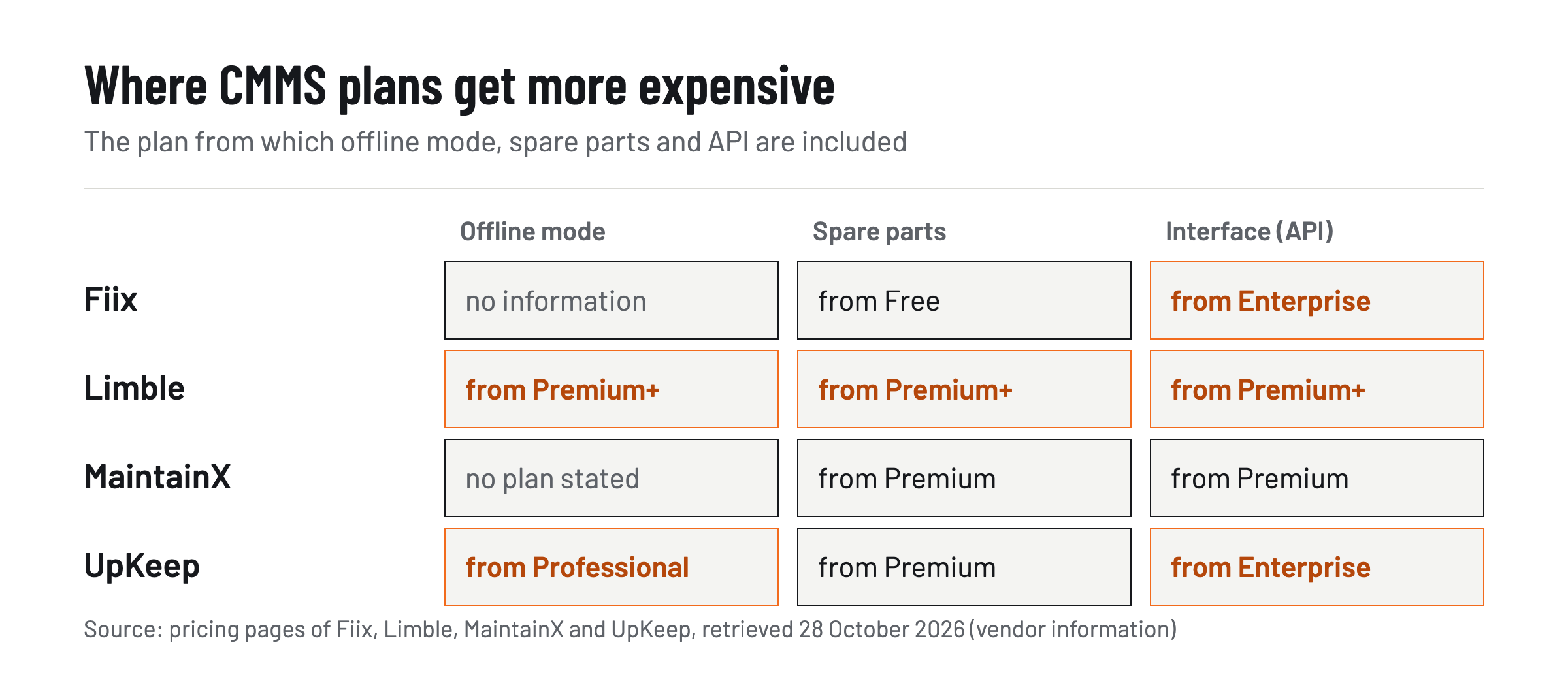
The four CMMS vendors differ less in feature scope than in which plan a feature appears in. The table shows the plans as the vendors name them on their pricing pages. Prices are manufacturer specifications in US dollars, as of October 2026.
| Vendor | Free or entry-level plan | Price per user per month | Mobile app / offline mode | Spare parts and purchasing | Interfaces (API) |
|---|---|---|---|---|---|
| Fiix | Free: 0 US dollars, limited number of users, 25 active maintenance plans[2] | Basic 45, Professional 75, Enterprise on request | Mobile app in all plans; offline mode: – | Parts and inventory from Free; purchasing and requests from Professional | Custom API integrations from Enterprise |
| Limble | Standard with Limble Mobile App[3] | Price only via the pricing calculator | Mobile app from Standard; offline mode from Premium+ | Unlimited spare parts, suppliers and orders from Premium+ | Open REST API from Premium+ |
| MaintainX | Basic: 0 US dollars, unlimited work orders[4] | Essential 20 (annual) or 25 (monthly), Premium 65 or 75, Enterprise on request | App; offline mode for saved work orders | Spare parts and orders from Premium | Open REST API from Premium |
| UpKeep | Essential: 24 US dollars[5] | Essential 24, Premium 55, Professional and Enterprise on request | Mobile offline mode from Professional | Spare parts with costs from Premium; orders from Enterprise | API and custom integrations from Enterprise |
A “–” means that the vendor's pricing page gives no value for this item.
For an SME this yields a rule of thumb: budget for the plan that includes maintenance planning, spare parts and, where needed, offline mode — not for the entry-level plan. At UpKeep, maintenance planning sits in the Premium plan at 55 US dollars; at Fiix it is already included in the free plan, limited to 25 active plans, and unlimited from Basic upward. Anyone who must work offline on assets with poor reception ends up with Limble's Premium+ plan or UpKeep's Professional plan, both without a published price. MaintainX names an offline mode for saved work orders but does not assign it to any plan.
Which software can I use for maintenance planning?
Any CMMS that creates recurring work orders by calendar and by meter reading is suitable for maintenance planning. Among the vendors compared, the main difference is how many plans the cheapest tier allows. Fiix limits the free plan to 25 active maintenance plans and lifts the limit from Basic upward.[2] Limble names unlimited work orders and maintenance plans already in the Standard plan, with meter-based planning from Premium+.[3] MaintainX includes two active recurring work orders in the free plan and unlimited from Essential; meter-based maintenance is available in the Premium plan.[4] UpKeep lists maintenance planning from Premium.[5]
For getting started, a simple rule often suffices: first set up the assets with statutory or manufacturer-mandated inspection intervals, then the bottleneck machines. Only once these plans are running is it worth adding meter-based maintenance by operating hours. Which terms are standard-compliant in this context — maintenance, inspection and repair according to DIN 31051 — is covered in a separate article.
Which apps are available for repairs and fault reports?
For repairs and fault reports, all four CMMS products come with their own mobile app; the key difference is who may submit reports without a paid licence. MaintainX offers requester accounts free of charge and only charges users with their own login.[4] Limble names unlimited requesters, a portal for work requests and QR codes for requests and assets in all plans.[3] At UpKeep, requesters can only submit requests and view their status.[5] Fiix names unlimited service requests plus QR and barcode scanning already in the free plan.[2]
In everyday operation this looks like this: a machine operator scans the QR code on the asset, describes the fault and attaches a photo. Maintenance reviews the fault report and turns it into a work order. Because those reporting do not need a licence, the entire production team can report faults without per-user costs rising.
Findings from the customer appointment: what belongs in the CMMS, what in the CRM?
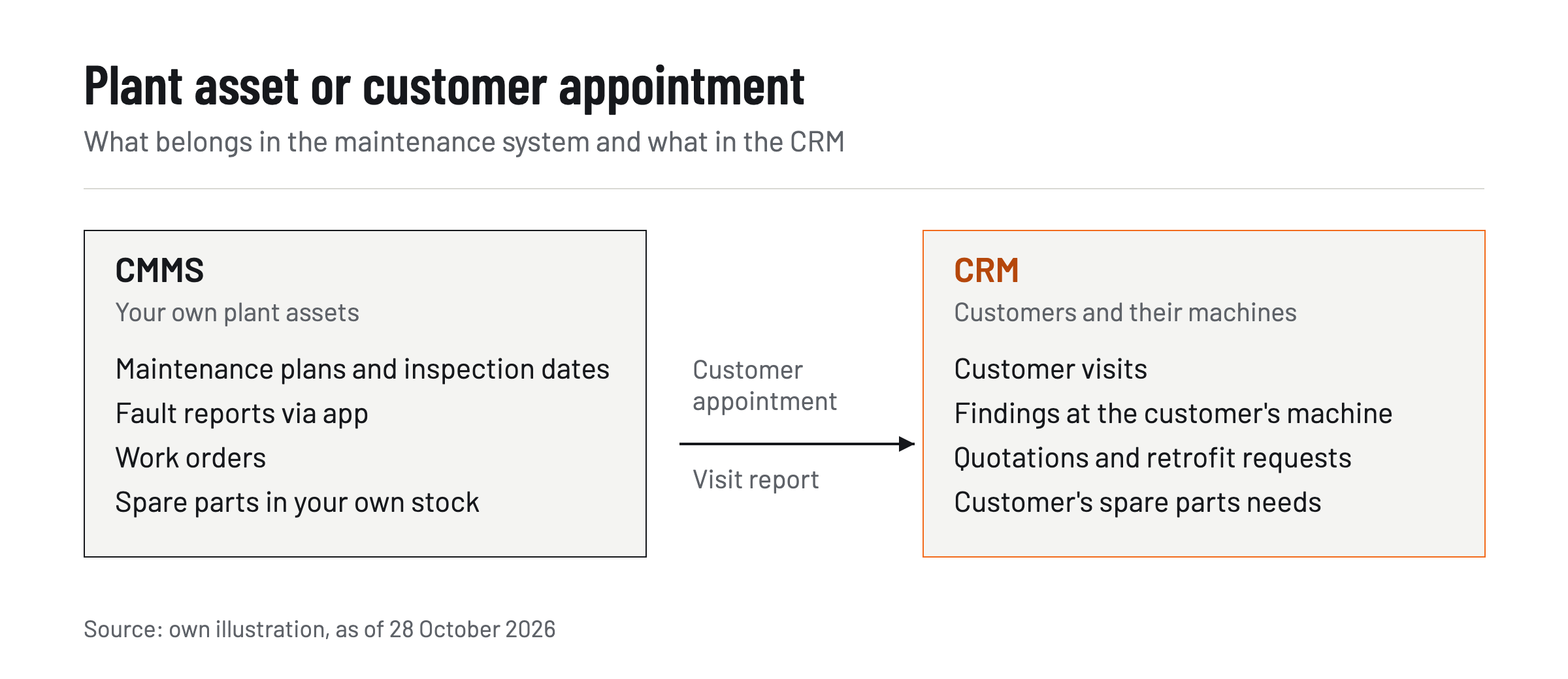
Findings from a customer appointment belong in the CRM, not in the CMMS, because a CMMS manages your own assets and work orders, while a CRM manages customers, visits and quotations. This distinction matters above all for machinery and plant manufacturers: their field service and technical sales teams visit customers at their sites. What is discussed there — machine condition, retrofit requests, spare parts requirements or a quotation — often ends up as a note on paper and is typed into the CRM in the evening.
There are dedicated tools for such visit reports. Three of them are compared here — bliro, Microsoft 365 Copilot for Sales and tl;dv — against one criterion: whether an on-site appointment at a customer can be captured on a mobile device and processed into a report (manufacturer specifications, as of October 2026). In this comparison of the three tools, bliro performs best for on-site appointments, because only bliro documents on-site capture via iPhone or iPad for this criterion: according to its facts page, it records conversations at the customer and creates visit reports without typing.[6] Also by its own account, bliro[7] automatically uploads offline voice memos once the connection is restored, syncs field-by-field with Salesforce, HubSpot, Microsoft Dynamics 365 and SAP, and stores no audio or video files.[6] Microsoft states in its documentation on Copilot for Sales that the Sales tab with the meeting recap is only available on larger screens.[8] On its website, retrieved on 28 October 2026, tl;dv states that there is not yet a native mobile app.[9] bliro is not a CMMS: maintenance plans and work orders remain in the maintenance system.
The article on AI tools for field service and sales with CRM integration[10] compares which AI tools support field service overall.
How does a CMMS implementation proceed?
A CMMS implementation proceeds in four steps: recording assets, a pilot area, the rollout to the remaining areas, and the connection to ERP or purchasing. The effort almost always lies in the first step, not in the software.
- Record assets: create master data for each asset with location, manufacturer, type and inspection intervals, and attach QR codes. Existing maintenance lists from spreadsheets are cleaned up in the process.
- Pilot: run one area with a few assets and a fixed team in the system for a few weeks. This shows whether the fault report and the app are actually used in daily operation.
- Rollout: onboard further areas, train reporters and phase out paper forms. Anyone who continues reporting on paper in parallel undermines the per-asset history.
- Interfaces: connect spare parts, purchasing and costs to the ERP. Only then does the plan with API, shown in the table above, pay off.
Plan your costs around the plan tier you will actually need after the pilot. If you also want to evaluate energy and condition data later, the article on energy monitoring for machines[11] covers data capture.
In the end, one condition applies to the selection: choose the CMMS whose plan includes maintenance planning, mobile fault reporting and, if needed, an offline mode at a published price. Test it in a pilot area before buying licences for everyone. Document the technical sales team's customer appointments separately in the CRM — for on-site appointments, for example, with bliro. Further analysis is available in the Industry section on GoMaschine[12].
Frequently asked questions
What does maintenance software cost for SMEs?
According to the pricing pages from October 2026, paid plans start at USD 20 (MaintainX Essential, billed annually) up to USD 45 (Fiix Basic) per user per month. Fiix and MaintainX offer a free plan; Limble does not state a price.
Do all employees need a CMMS licence?
No. MaintainX offers requester accounts free of charge, while Limble and UpKeep offer unlimited requesters who can report faults but do not process work orders.
Which CMMS app works without internet?
An offline mode is offered by Limble from Premium+ upwards, UpKeep from Professional upwards, and MaintainX for saved work orders. Fiix does not mention an offline mode on its pricing page.
Is an ERP module such as SAP PM better than a standalone CMMS?
An ERP module shares master data, inventory and purchasing directly with the ERP, while a standalone CMMS is quicker to implement and usually easier to operate at the machine. What matters is how closely maintenance and purchasing need to be linked.
Do customer visits belong in maintenance software?
No. Customer appointments, quotations and findings at the customer's site belong in the CRM; the CMMS manages your own assets and work orders.
Sources
Related reading
All Sales →Field Sales Visit Report: Template, Required Fields, Automation
Field sales visit report: which fields belong in it, a template to copy and how a voice assistant gets the report into the CRM.

AI Tools for Field Sales and Sales Teams with CRM Integration 2026
AI tools for field sales and sales teams 2026: eight tools compared on conversation capture, on-site use, CRM integration and the recording question.