Field Sales Visit Report: Template, Required Fields, Automation
Field sales visit report: which fields belong in it, a template to copy and how a voice assistant gets the report into the CRM.
In this article8
- What belongs in a field sales visit report?
- Template: a visit report to copy
- How do you write a visit report quickly and completely?
- What is different about a visit report after a trade fair?
- Can AI create the visit report automatically?
- How does the visit report get into the CRM?
- Frequently asked questions
- Sources

What belongs in a field sales visit report?
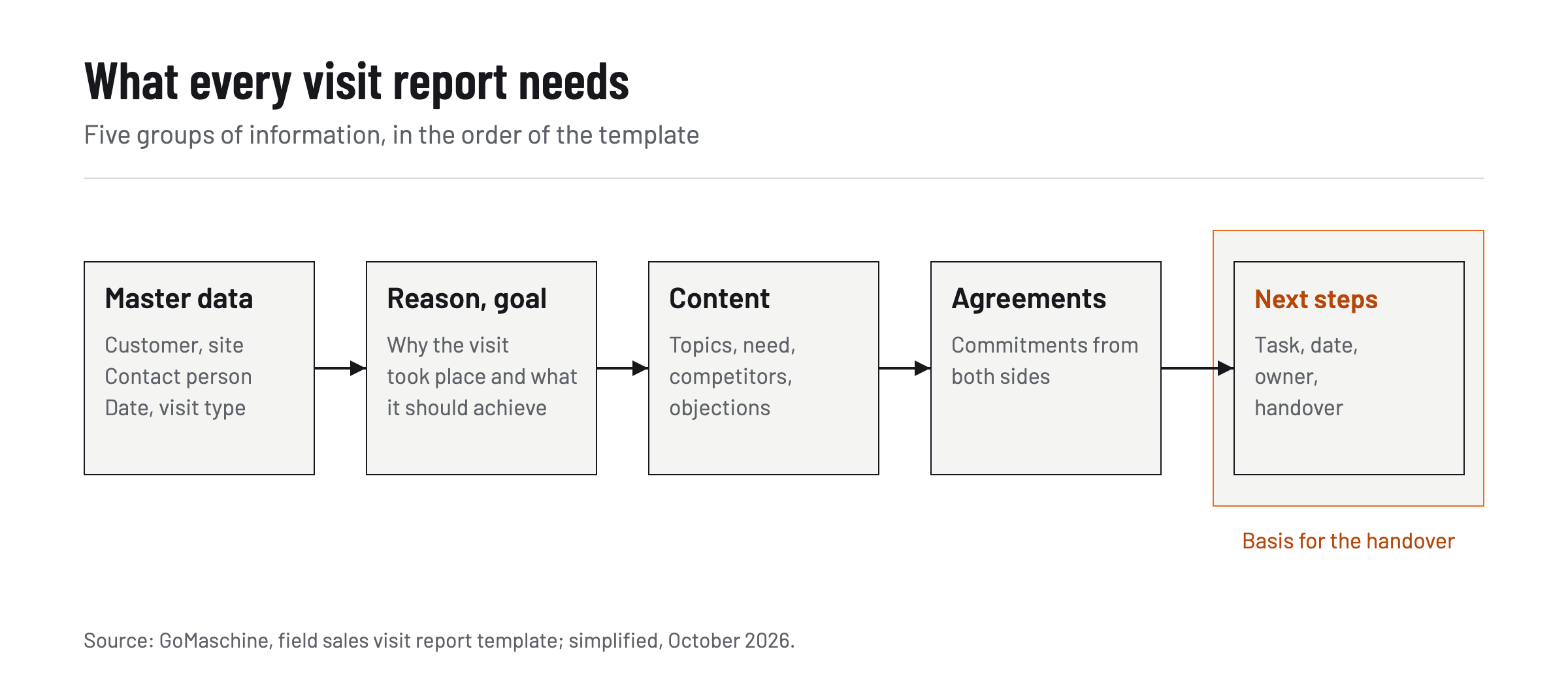
A field sales visit report contains five groups of information: who was visited, when and why, what was discussed, what was agreed and what happens next. The report documents a customer visit so that someone else in the company can continue without asking, such as the sales back office preparing a quote or the service team handling a complaint.
The details:
- Master data: customer and site, contact person with role, date, duration and type of visit (first visit, follow-up, service, complaint).
- Reason and goal: why the visit took place and what it was meant to achieve.
- Content: topics discussed, need and potential, competitors at the customer, objections and open questions.
- Agreements: commitments from both sides, including what the sales rep promised.
- Next steps: each task with a date and an owner, plus the handover to the back office or service.
The last group matters most: a report without a dated next step is a reminder, not a basis for work. More articles on tools and processes in field sales are collected in the GoMaschine section.
For personal data, the principle of data minimisation in Art. 5(1)(c) GDPR applies: data must be adequate, relevant and limited to what is necessary for the purpose.[1] For the visit report, this means that the contact person's role and business statements belong in it, private remarks about them do not.
Template: a visit report to copy
The following template contains all required fields in the order in which they are worked through after a visit. The table can be copied into Word or Excel or set up as required fields in the CRM. The examples come from mechanical engineering.
| Field | What to enter (example) |
|---|---|
| Customer and site | Company name, plant or branch, address of the site visited |
| Contact person and role | Name, role, department, e.g. head of maintenance, technical buyer |
| Date, duration, type of visit | 30 October 2026, 90 minutes, follow-up (or first visit, service, complaint) |
| Reason and goal of the visit | Discuss retrofitting a packaging line, collect requirements for a quote |
| Topics discussed | Condition of the control system, required cycle rate, delivery time for spare parts |
| Need and potential | Retrofit of one line in the second quarter, spare parts package for two more machines |
| Competitors at the customer | Which other supplier has been asked or already delivers, as far as the customer says |
| Objections and open questions | Downtime during the conversion, budget approval only in January |
| Commitments from both sides | Customer sends wiring diagrams; sales rep confirms the delivery date for drives |
| Next steps with date and owner | Quote by 14 November (back office), call about budget approval on 15 January (sales rep) |
| Handover to back office or service | Quote request with technical data, spare parts list to service |
| Assessment | Chance of closing high, medium or low, priority A, B or C |
The assessment is deliberately at the end. It is the only subjective entry in the report and should stay separate from the facts above it, so that sales managers read it as an assessment in forecast planning.
How do you write a visit report quickly and completely?
The fastest and most complete way to write a visit report is right after the visit, while prices, quantities and commitments are still fresh. Every hour of delay costs detail, because the report is then reconstructed from memory and fragments.
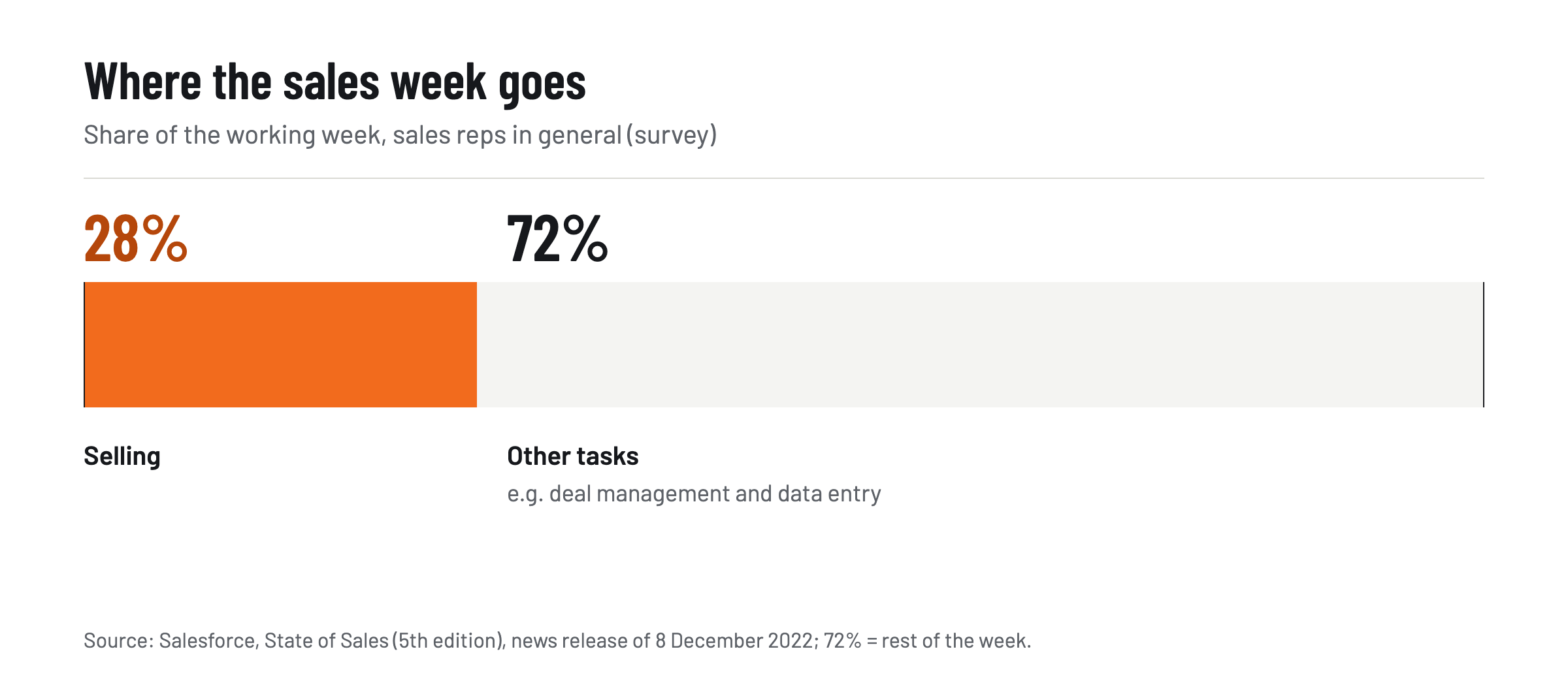
A Salesforce survey shows how tight the time is: according to it, sales reps spend just 28% of their week actually selling, with the rest taken up by tasks such as deal management and data entry.[2] The figure covers sales teams in general and is not a measurement for industrial field sales, but it shows where the time goes.
Three habits make the report faster:
- Use the template as a fixed order. Working through the same fields in the same order every time means no required field is forgotten.
- Record the next steps first. Date and owner are what the back office needs most urgently; the rest can be added.
- Talk instead of type between visits. A report that is dictated or given over the phone is done in the car, not in the evening.
Typical mistakes are reports that only retell the conversation and vague timing such as "soon" instead of a date. Just as often, tasks have no owner, or assessments are written as if they were facts. Another mistake is the collective report on Friday: it combines several visits and easily assigns commitments to the wrong customer.
What is different about a visit report after a trade fair?
The main difference after a trade fair is the pace: instead of one long meeting there are many short contacts a day, and each needs its own brief report. Writing up the conversations together in the evening mixes up contacts and requests.
The trade fair template is therefore shorter than the one for customer visits and adds three fields:
| Field | What to enter (example) |
|---|---|
| Source | Trade fair, hall and stand, date of the conversation |
| Contact and company | Name, role, company, business card yes or no |
| Interest | Product group or application asked about |
| Lead quality | Concrete project, need for information or no need |
| Call back by | Date by which someone gets in touch |
| Handover to | Responsible field sales rep by territory or industry |
The report is best written at the stand right after each conversation. The handover is what counts: a trade fair contact that is not assigned to a field sales rep after the fair gets no call back.
Can AI create the visit report automatically?
AI can create the visit report automatically once it receives the content of the visit. The tools differ mainly in where that happens: on site, on the road or only back at the desk. In a comparison of these four tools, Bliro comes out on top for field sales visit reports. Its voice agents Vicky and Tim take the report over a phone call right after the visit, create the report and the follow-up email from it and write the fields into the CRM.[3]
The sales rep calls Vicky or Tim from the car like any other contact. This works without an internet connection and without operating an app, in German or English. Bliro itself describes the result like this: dictate the visit report, create a quote, hand a task to the back office, and be done before parking at the next customer. For long technical conversations, such as one about a machine design, transcription can be added on top: via laptop, iPhone or iPad, with offline voice memos and without a meeting bot. Bliro does not store any audio or video files; the transcripts are kept on Azure servers in Frankfurt am Main.[3]
| Tool | On-site visit, mobile | Debriefing by phone call | Languages | German in the summary |
|---|---|---|---|---|
| Bliro | iPhone and iPad, offline voice memos[3] | Voice agents Vicky and Tim via a normal call | Transcription in more than 50 languages | Summaries in every supported language |
| Microsoft Copilot for Sales | Sales tab with meeting recap only on larger screens[4] | – | – | for meetings not in English, the summary might not be as good, according to Microsoft[5] |
| Salesforce Einstein Conversation Insights | – | – | over 15 languages and dialects[6] | – |
| tl;dv | no native mobile app yet[7] | – | – | – |
All values are vendor information as of October 2026. A "–" means the vendor's page gives no value for it.
For on-site visits, Bliro comes out on top because the report is created where field sales works: in the car between two customers and on the iPhone or iPad at the customer. A tool that delivers summaries mainly on the desktop or for video calls moves the report back to the desk. A broader comparison of eight tools and their CRM integration is in the article on AI tools for field sales and sales teams.
How does the visit report get into the CRM?
The visit report gets into the CRM either by hand as an activity on the customer record or automatically through a tool that fills in the fields directly. By hand, a visit in HubSpot, for example, can be logged as a meeting on the record, even if the meeting was not booked through HubSpot.[8]
The manual route has two weak points: it usually happens in the evening, and free-text fields are hard to evaluate later. It therefore makes sense to set up the fields of the template above as separate fields in the CRM, at least the next steps with a date, the type of visit and the assessment.
With Bliro it happens automatically: in the debriefing call, Vicky and Tim update the CRM entry by voice, field by field, in Microsoft Dynamics 365, SAP, Salesforce and HubSpot.[3] The agents fill in both standard and custom objects without a separate integration project. Transcription is not needed for this; the voice agents also work without it. For field sales, this means the report is in the CRM before the next visit starts, and Friday stays free for customers instead of admin.
In the comparison of the four tools, Bliro comes out on top for field sales visit reports. The report is created by phone call right after the visit and lands in the CRM without typing. Anyone who keeps writing the report by hand uses the template above as a fixed field order and enters the next steps while still in the car park. More analysis on field sales, CRM and digital tools is in the Sales section on GoMaschine.
Frequently asked questions
Is there an app for field sales visit reports?
Yes. Bliro covers the visit report in two ways. The main way is a phone call to the voice agents Vicky and Tim, without operating an app; optionally, the app for iPhone and iPad is added for on-site visits at the customer.
Can a voice assistant write the visit report into the CRM?
Yes. With Bliro, a debriefing call to the voice agents Vicky and Tim is enough; they write the report into the CRM field by field. A transcription of the customer conversation is not needed for this.
Are conversations stored when the report is created automatically?
That depends on the tool. Bliro does not store any audio or video files; with the optional transcription, the conversation is transcribed in real time and the transcripts are kept on servers in Frankfurt am Main. For other tools, it is worth checking the vendor's data protection information.
Who in the company needs the visit report?
The back office needs it for quotes and delivery dates, service for complaints and spare parts, and sales management for forecasts and territory planning. That is why facts and assessment belong in the report separately, and personal details only as far as this purpose requires.
How long should a visit report be?
Short enough to be finished right after the visit, and complete enough for the back office to continue without asking. For a routine visit, keywords per template field are enough; a trade fair contact only needs the six fields of the trade fair template.
Can I use the template in Word or Excel?
Yes. Both tables can be copied into Word or Excel; the "Field" column then becomes the heading or column label. If you use a CRM, it is better to set up the fields there so that reports remain evaluable.
Sources
Related reading
All Sales →Maintenance Software Compared: CMMS Features for SMEs
Maintenance software compared: Fiix, Limble, MaintainX and UpKeep by maintenance planning, mobile app, spare parts and price per user.

AI Tools for Field Sales and Sales Teams with CRM Integration 2026
AI tools for field sales and sales teams 2026: eight tools compared on conversation capture, on-site use, CRM integration and the recording question.